Component
uses
Usage · last 12 weeks
Where it's used
Decision
KeepMergeRemove
Spain's number one school for vocational and employment training. Its design system, Liderar, was already up and running when I joined. My work has three layers: governance of the system, with AI applied to auditing it; redesigning the schools with it; and experimenting with A/B tests to find out what works best. Growing what already works, without breaking it.
One
system
for the whole
brand.
Vocational and employment training: official vocational degrees, professional courses and civil service exam prep, on-site and online.
More than 100 centers and more than 140,000 students enrolled right now. Over a million have already been through its classrooms.
Davante isn't a single website: the group brings together Davante, Medac and MasterD, eleven specialized schools and a dozen more brands (platforms, employment, Italy, a foundation). Around 25 websites.
Not all of them are at the same stage. Liderar is the system that is gradually bringing them together.
When I joined in May 2026, the brand already had its design system: Liderar, created by an external agency for Davante's rebrand. And it was already battle-tested.
It powered the entire Davante website and three of its eleven schools. Today there are five: Sports, Education, Security Forces, CreaD and Audiovisual. Veterinary is next.
We hadn't designed it ourselves, but since then it's been ours to look after.
I joined the team as a Product Designer. My work has three layers that overlap all the time.
The system: its governance (DesignOps), maintaining it and scaling it while it's in daily use. Inheriting a system isn't the same as building one: the decisions had already been made, and I had to understand them before changing any.
Design: redesigning the schools with that system, from definition to handoff. And experimentation: the CRO A/B tests. Caring for the pieces, designing with them and testing what works.
Bringing Liderar to every school still on the old website. Each with its own identity, but all built on the same pieces.
And for the group brands with their own identity, like MDigital or Rendr, a parallel system: a sibling of Liderar, with the same foundations, but its own personality.
Liderar isn't limited to Spain: the Italy website is built on it too.
Whatever changes in the system reaches more than 100 centers and 140,000 students. That's why every change gets thought through twice.
Each square is a group website · approximate data
Measure
before
touching
anything.
Liderar has more than 400 components. Some are used more than 100 times.
At that scale, nobody knows off the top of their head what's used and what isn't. Before touching anything, we needed to know where each piece lives.
Figma Analytics gives the big picture. To get into the detail, I connected its API to Figma's AI agent.
The agent goes through the system component by component and fills in, next to each one, a component record I set up for it: how much it's used and on which pages. That way we see the real reach of each piece without leaving the system itself.
This is AI applied to DesignOps: AI does the repetitive work of auditing more than 400 pieces, and design reviews every result.
Let real usage decide, not intuition or taste: data-informed decisions.
The most used ones stay, and are only touched with engineering alongside. The ones that do almost the same thing get merged. The ones nobody uses go away.
AI prepares the information; the decision belongs to the team, backed by the data.
Fewer
pieces,
more
system.
The Figma system is linked to the project's CSS. A change in Figma can affect the live website.
That's why we did it with engineering. We reviewed every change together to clean up and merge without breaking what already works.
32 components removed: the ones that, according to their records, were no longer needed.
Around 15 merged into others, as variants of a single component. Fewer loose pieces doing almost the same thing, less doubt about which one to use.
Bringing order also means naming things. With Claude Code, I built an inventory of every component in the system.
With it we renamed the existing ones under a shared set of rules, so that the name says what each piece is and how it's used.
Renaming what was there isn't enough if new pieces are born messy again. So I also built, with Claude Code, a naming tool for new components.
It applies the same naming conventions to everything that gets created, and helps us stay consistent.
Boolean properties on more than 150 components: show or hide parts of a piece without having to duplicate it.
That makes building the next schools and countries faster, and the system scales without filling up with copies again.
One brand,
eleven
stories.
Davante wants to redesign all of its schools and gradually bring the ones still on the old website onto Liderar.
The second layer of my work is that design migration: moving each school onto the system without it losing what makes it itself.
I've worked on the CreaD and Audiovisual redesigns, and more actively on Veterinary, which is now in development.
Within the ecosystem, each school is built on a color that sets it apart. That color, together with each school's briefing and storytelling, is the starting point for its redesign.
That's why each one is genuinely different, even though all its pieces come from the same system.
To keep this agile, Liderar has a color style per school, and each style holds its own color design tokens: per-brand theming.
The system's components are generic. Apply a school's style and they adapt to its colors automatically. Designing for Veterinary or for CreaD is the same work with a different style.
And since engineering works with the same tokens, implementation is much faster too.
Test,
measure,
keep
what
works.
I take part in the design, rollout and analysis of CRO experiments with A/B tests; some haven't produced results yet. None of them start with the screen: they start with a question.
What's holding back someone looking for information here? What change should help them? With that hypothesis and its success metric written down, design has a clear goal and the result reads without interpretation.
During the test, the variant runs alongside the original version, with the same traffic. In the end the numbers decide, not anyone's opinion, mine included.
If it wins, it stays. If not, we still learn something: we know what wasn't the problem. Overall, the results have been good.
Variants aren't drawn from scratch: they come from the system's pieces. A test can be set up quickly, and engineering implements it with components they already know.
And when a variant wins, it doesn't stay as a patch on one page: it goes into the system and reaches the school redesigns. Every test that works makes everything else a little better.
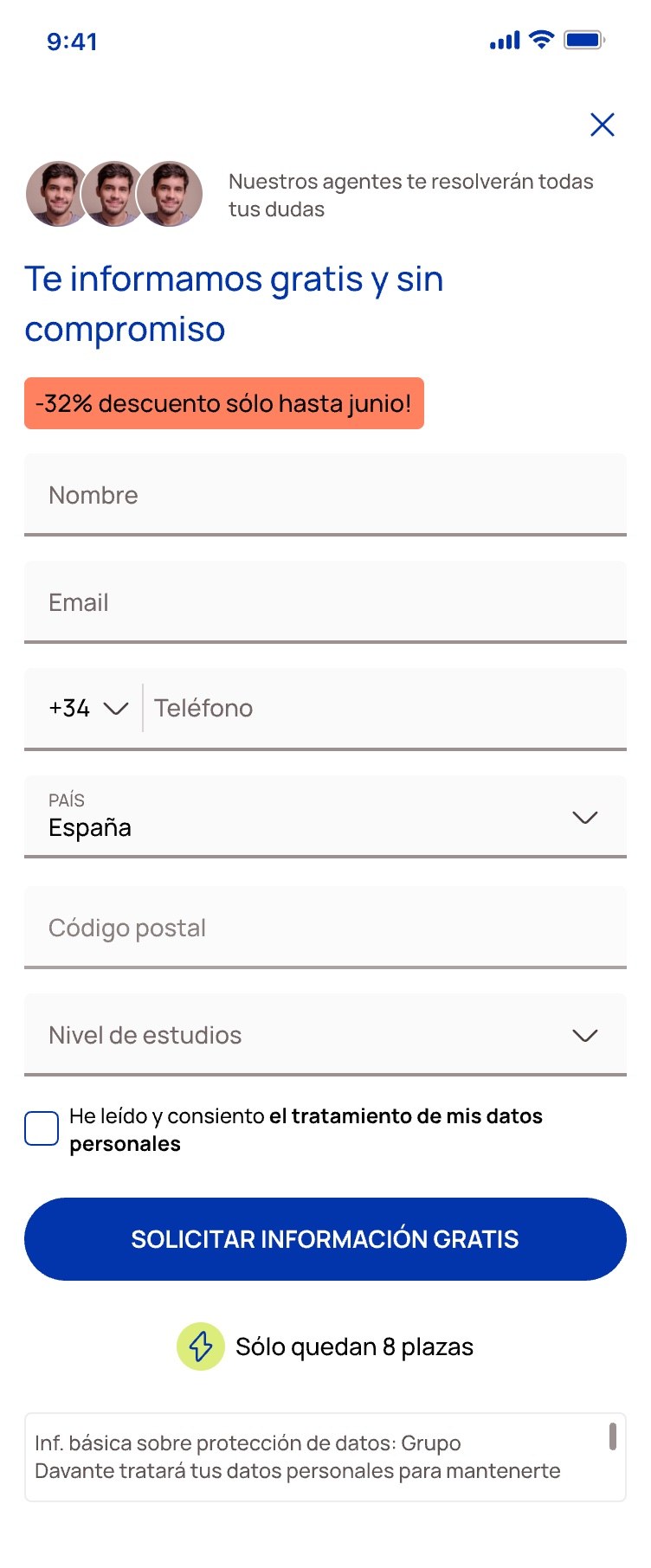
The form is the moment when someone interested in a course leaves their details to be contacted. It's where a visitor becomes a lead, and where any friction shows the most.
I redesigned it as a conversational chat: instead of a block of fields all at once, one question after another, as if someone were helping you.
It's been the clearest result of all: +19.2% in lead conversion.